FERAL Animal Survival controls and keybinds
Every PC keybind, ability input, water movement key and touch control note for FERAL: Animal Survival on Roblox — plus why pressing F sometimes does nothing on a young animal.
PC keyboard and mouse controls
FERAL: Animal Survival runs inside Roblox, so core movement follows the standard Roblox desktop layout while species actions, swimming and tracking bind to letter keys shown on the in-game HUD. Check the on-screen button prompts whenever a patch adds a new creature class.
| Input | Action in FERAL | When it applies |
|---|---|---|
W, A, S, D or Arrow keys |
Walk and steer | Every animal on land and at the waterline |
Mouse |
Rotate camera and aim | Aiming matters before triggering forward bursts like LUNGE |
Shift |
Sprint / run | Drains stamina; save a reserve before approaching open water |
Left-Click |
Basic bite or strike | Close-range combat attack |
F |
Species active ability | Fires active skills such as LUNGE, Take Down, Crusher Bite or Rear End Strike once available |
E |
Contextual interact / dive | Used for world prompts and submerging on aquatic or semi-aquatic animals |
Q |
Surface in water | Raises swimmers back to the waterline |
T |
Scent or chat prompt | Check your HUD prompt, as Roblox chat and tracking binds can overlap by layout |
Why your ability key (F) is not working
New players frequently press F on their first spawn and think the keybind is broken. Three things determine whether an ability fires:
- Growth stage gates. Spawning starts you as a baby animal (covered in how to grow faster). Active combat abilities unlock or reach full effectiveness as you grow rather than letting a fresh spawn spam bursts immediately.
- Active vs passive traits. Not every roster advantage is a button press. On the Red panda, Rear End Strike is an active space-maker, whereas climbing is a passive movement trait triggered by running into climbable trees rather than pressing
F. Check the best animals ranking for which animals rely on active strikes. - Cooldown and stamina state. Committing to a forward burst like the wolf's LUNGE puts the skill on cooldown and leaves you exposed if you miss from too far away. Watch the on-screen ability icon before re-engaging.
Water, diving and climbing movement
Waterways, rivers and the hidden lake (mapped on the map and water guide) change how movement inputs behave depending on your species:
- Land carnivores and herbivores swim across surface crossings to break chases or drink, but lose speed compared with open ground.
- Water-oriented bruisers such as the hippo fight comfortably along shorelines where land hunters struggle to disengage.
- Diving controls (
Eto dive,Qto surface) apply to animals built for underwater movement; always watch oxygen or stamina indicators on your HUD before diving under cover. - Tree climbing is unique to the Red panda among the confirmed roster, turning forest lines into vertical escape routes where ground predators cannot follow.
Mobile touch and controller inputs
When opened in the Roblox app on touch devices or with a gamepad connected, movement maps to the standard Roblox left thumbstick while sprint, basic attack and species abilities appear as contextual on-screen buttons on the right side of the display. Because we only mark device compatibility verified after testing each client directly, check the current platform status on the Roblox setup guide and verify button placement in a safe forest clearing before entering combat.
Combat input habits that save banked growth
Dying resets growth progress, which indirectly delays your next unlock in the amber calculator (and lowers the value of boosts on gamepasses and 2x Amber). Two mechanical habits prevent most beginner deaths:
- Never hold
Shiftdown to zero stamina while travelling. Arriving at a lake with an empty stamina bar means you cannot sprint out when an adult predator steps out of the tree line. - Aim with the camera before pressing
F. Forward lunges travel along your facing direction; firingFin panic while your camera is angled sideways wastes your only gap-closer or escape window.
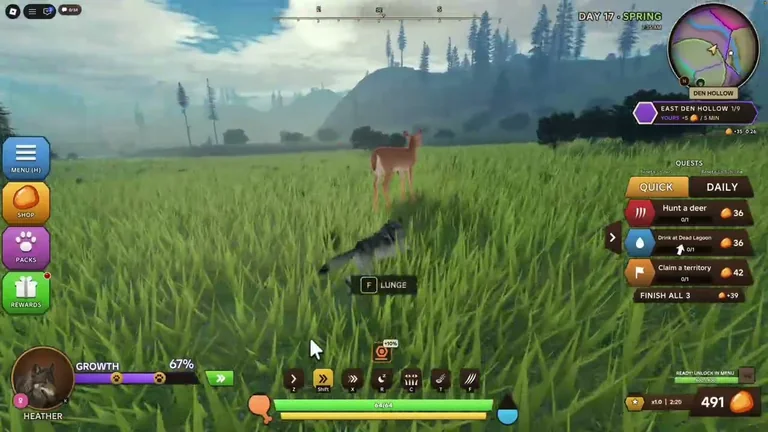
PC HUD and LUNGE timing in action
YouTube · loads on clickQuestions players ask
What key uses your special ability in FERAL Animal Survival?
Press F on PC keyboard layouts, or tap the on-screen ability button on touch interfaces. If nothing happens, check your HUD icon for cooldowns, growth-stage requirements, or whether your animal uses a passive trait instead.
How do you sprint in FERAL Animal Survival?
Hold Shift while moving with W, A, S, D. Avoid draining your stamina bar completely while crossing open ground so you keep enough reserve to escape an ambush.
How do you dive underwater in FERAL Animal Survival?
Aquatic and semi-aquatic species use E to dive below the surface and Q to swim back up on PC, with contextual vertical swim buttons on touch screens. Land animals stay on the surface when crossing rivers.
What button climbs trees in FERAL?
Climbing is a passive trait on the Red panda rather than a universal keybind. Approach a climbable tree trunk as a Red panda to ascend out of ground reach; other roster animals cannot climb trees.
Can you change keybinds in FERAL Animal Survival?
Check the Roblox in-game pause menu and HUD settings after spawning. Standard movement and camera sensitivity follow Roblox client settings, while species prompts appear directly on the HUD.